
Before even getting started with my tutorial, was working with my partner on the CakePHP set up. He noticed that many of the PHP files had no closing ?> We both were always taught you had to close them, and couldn't figure WTF it was even working. So quick Google of course lead me to the PHP documentation: "If a file is pure PHP code, it is preferable to omit the PHP closing tag at the end of the file. This prevents accidental whitespace or new lines being added after the PHP closing tag, which may cause unwanted effects because PHP will start output buffering when there is no intention from the programmer to send any output at that point in the script." Seriously…in PHP only code the closing tag can have unwanted effects? It's that picky now???? I suspect we will continue to put in the closing tag because it just looks weird…
Anyway, on today's lessons…moving into the section on data types – this should be a fairly quick read since they are, for the most part, fairly standard across languages.
First integers, all pretty basic stuff.
<?php

    $test1 = 17;

    $test2 = "25";

    $test3 = "Not a number, right?";


    echo "Let's add: " . ($test1 + $test2);

    echo "<br />...and subtract: " . ($test1 - $test2);

    echo "<br />...and multiple: " . ($test1 * $test2);

    echo "<br />...and divide: " . ($test1 / $test2) . "<br /><br />";


    if(is_numeric($test1))

        echo $test1 . " is numeric<br />";

    else

        echo $test1 . " is NOT numeric<br />";


    if(is_numeric($test2))

        echo $test2 . " is numeric<br />";

    else

        echo $test2 . " is NOT numeric<br />";


    if(is_numeric($test3))

        echo $test3 . " is numeric<br />";

    else

        echo $test3 . " is NOT numeric<br />";

?>

More things to remember on the whole "loose" type casting, such that a "string" number can be used as a number. But hey, you can actually tell it what type you want something to be! Yay! And you can get the current type of variables.
<?php

    $test1 = 17;

    $test2 = "25";

    $test3 = "Not a number, right?";


    echo $test1 . " is " . gettype($test1) . "</br />";

    echo $test2 . " is " . gettype($test2) . "</br />";

    echo $test3 . " is " . gettype($test3) . "</br />";

?>
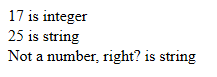
So what if I tell it to make my string an int?
<?php

    $test1 = 17;

    $test2 = (int)"25";

    $test3 = (int)"Not a number, right?";


    if(is_numeric($test1))

        echo $test1 . " is numeric<br />";

    else

        echo $test1 . " is NOT numeric<br />";


    if(is_numeric($test2))

        echo $test2 . " is numeric<br />";

    else

        echo $test2 . " is NOT numeric<br />";


    if(is_numeric($test3))

        echo $test3 . " is numeric<br />";

    else

        echo $test3 . " is NOT numeric<br />";

?>
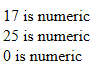
No error, it just changes it to 0? Okay…I'd rather it tell me "hey stupid that's not a number" but good to know. Floats for similar except they have decimals and we can round.
<?php

    $test1 = 123456.789;

    $test2 = 987.654321;

    $test3 = $test1 / $test2;


    echo "<strong>Test 1:</strong> " . $test1 . "<br />";

    echo "<strong>Test 2:</strong> " . $test2. "<br />";

    echo "<strong>Test 1 / Test 2:</strong> " . $test3. "<br />";

    echo "<strong>Cast result to an int:</strong> " . (int)$test3. "<br />";

    echo "<strong>Round result instead:</strong> " . round($test3, 2). "<br />";

?>
But, we do see an interesting difference between casting a float to an INT versus Rounding, namely the cast always rounds down while Round rounds properly.
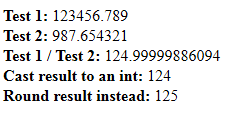
Strings…pretty straight forward. Here in comes the difference between using double and single quotes though, another gotcha to keep in mind. With ColdFusion and JS there is no difference, but there is in PHP:
<?php

    $myname = "Summer";


    echo "My name is $myname";

    echo '<br />My name is $myname';

?>
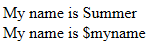
Though I suppose it can be negated by mostly using the concat stuff we've already being doing, i.e. tack on the variable with a . instead of putting in inside the rest of the string. And yep, they say it is usually preferred for more readable code – I tend to agree. Escaping with a \ I actually remembered!
Next page, more string functions. At least PHP is not case sensitive on its commands (at least so far), so I can at least write the function names in a semi-readable way.
<?php

    $testString = "The cake is a lie";


    echo "Length: " . strLen($testString) . "<br />";

    echo "All lower: " . strToLower($testString) . "<br />";

    echo "All upper: " . strToUpper($testString) . "<br />";

    echo "Where is the cake: " . strPos($testString, "cake") . "<br />";

    echo "Where is the Cake: " . strPos($testString, "Cake") . "<br />";

    echo "Where is the Cake: " . strIPos($testString, "Cake") . "<br />";

    echo "Gimme: " . subStr($testString, strPos($testString, "cake"), strLen("cake")) . "<br />";

?>
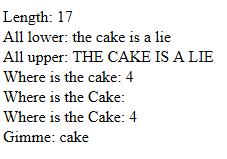
So strPos is case sensitive…but there is a case insensitive version. Good. Name…dumb. Sounds like a bad Linux variant StripOS 😛 strPos tells us where to find the string bit, while we use subStr to actually pull out a bit. Man Find() and Replace() and the related functions are so much simpler to remember. One of the things I have always loved about CF – sensible, easy to remember function names!
And now…arrays….oh, look, the starting stuff is at least easy and the command actually makes sense 🙂 And it is nice that you can set the keys, so if you don't like starting with 0 or want to have in a numerical ID or something, it's useful.
<?php
$mybooks = array();
$mybooks[1547] = "D.N.Angel, Volume 12";
$mybooks[1545] = "Spice & Wolf, Volume 07: Side Colors";
$mybooks[1546] = "Kieli, Volume 07: As the Deep Ravine's Wind Howls";
$mybooks[1544] = "Book Girl and the Corrupted Angel (Book 4)";
$mybooks[1543] = "Ultra Cute, Volume 09";
echo $mybooks[1546];
?>
Can also do arrays of arrays (of arrays of arrays if you so inclined). And can use that foreach stuff to loop our array.
<?php
$mybooks = array();
$mybooks["Manga"] = array();
$mybooks["Light Novels"] = array(); $mybooks["Manga"][1547] = "D.N.Angel, Volume 12";
$mybooks["Light Novels"][1545] = "Spice & Wolf, Volume 07: Side Colors";
$mybooks["Light Novels"][1546] = "Kieli, Volume 07: As the Deep Ravine's Wind Howls";
$mybooks["Light Novels"][1544] = "Book Girl and the Corrupted Angel (Book 4)";
$mybooks["Manga"][1543] = "Ultra Cute, Volume 09";
foreach($mybooks as $genre => $value) {
echo "<strong>" . $genre . ":</strong><br />";
foreach($mybooks[$genre] as $thisTitle) {
echo $thisTitle . "<br />";
}
echo "<br />";
}
?>

Cool. The foreach still will take some getting used to, but I think I have the general gist. And despite my having put them in a mixed up order, it apparently sorted it itself while doing all that looping. That is nice versus having to remember to do an order by if you plan to do output grouping in ColdFusion.
Finishing up this chunk with array functions…implode? Explode?? *sigh* These names….
<?php

    $formatTypes = "Paperback|Hardback|Library|Fabric";


    $aFormatTypes = explode("|", $formatTypes);


    print_r($aFormatTypes);


    echo "<br /><br />";


    $sFormatTypes = implode(", ", $aFormatTypes);

    echo $sFormatTypes;

?>

So explode is basically like ListToArray(), while implode is similar to ArrayToList(), but the latter allows for more than a 1 character delimiter. Easy enough to understand at least. Oh, and they slid in another new idea – print_r. Seems similar to CFDUMP? So far, this tutorial has mostly had me using echo…what happened to the print command? Fell out of favor? Quick Google break…hmm, echo is marginally faster and can output multiple strings versus print. Wait so I can…
<?php

    $formatTypes = "Paperback|Hardback|Library|Fabric";


    $aFormatTypes = explode("|", $formatTypes);


    echo $aFormatTypes[0], "<br />", $aFormatTypes[1], "<br />", $aFormatTypes[2], "<br />", $aFormatTypes[3], "<br />";

?>

Okay, got it. Echo wins. Back to arrays,,,,usual stuff I'd expect, finding elements, stripping to unique values, sorting, and hey, build in "get something at random" function. Cool.
<?php

    $aFormatTypes = array("Paperback", "Hardback", "Library", "Fabric", "Hardback");


    if (in_array("Paperback", $aFormatTypes))

        echo "Found paperback";

    else

        echo "Paperback is missing!";


    echo "<br />";


    if (in_array("eBook", $aFormatTypes))

        echo "Found eBook";

    else

        echo "eBook is missing!";


    echo "<br /><br />";


    echo "Format types:<br />";

    print_r($aFormatTypes);


    echo "<br /><br />";


    $aFormatTypes = array_unique($aFormatTypes);

    echo "Unique format types:<br />";

    print_r($aFormatTypes);


    echo "<br /><br />";


    echo "Random format: " . $aFormatTypes[array_rand($aFormatTypes, 1)];


    echo "<br /><br />";

    echo "Sorted the array:<br />";

    sort($aFormatTypes);

    print_r($aFormatTypes);


    echo "<br /><br />";

    echo "Other way!:<br />";

    print_r(array_reverse($aFormatTypes));

?>

So why is it just sort to sort, but array_reverse to flip. Why not array_sort? Or sort and reverse? And why does sort return true/false (hence me having to do it before printing the array) while array_reverse just returns the result? At least they are mostly plain language commands, if inconsistent.
Since the next section is classes, which I think is pretty much all new to me stuff, I'll save it for another post. At least I'm threw most of the very basics…right?
(As a random aside? Anyone ridiculously anal over testing code/form values? As in it has to be "right" you can't just make stuff up? Just me? Okay… 🙂 )
Note: I've realized that there is a bug in the SyntaxHighlighter causing it to blank out the BR tags from my code. So if you see echo "" it is supposed to be echo "<br /><br />" and many of the other blank "" at in the concatenated strings are actually "<br />". So far I haven't found a fix as the code, and while this bug was report on the developer's GitHUb 2 years ago, he has never responded.