
When we moved over to doing all of our development using the Mach-II framework, it really forced us to separate our code into “layers”. So we have views, which display the content, listeners which tie the Mach-II framework to the rest of our application, the gateways and DAOs which interact with the database, etc etc. One part of this separation of code and display, is that your views for the most part should not have queries in them. They should have, at most, basic logic such as conditionals or formatting, but nothing heavy duty and certainly not queries.
However, sometimes what you need to display involves multiple queries, for example, cascaded content or related content. Now you can get complicated and a bit nasty with it. For example, for some infinite-level cascading categories, we use recursive functions to build a structure of structures of structures with each one tied by ID back to the parent. Yeah, it is messy, but it works for our purposes. For something such as simple cascaded content, however, this can be a pain and not necessarily the best way to do it, at least IMHO.
For example, on the redo of my personal site, I'm building a table of book series. One of the columns is a list of the genres the series' titles spans. Now I could just value list it into a string and pop it in, but I wanted each genre to be linked to its genre list page. User friendly navigation and all. I could have thrown the link around the code when I did the string, but that's mixing my display into my gateway – big no no there. I could have done the aforementioned structure of a structure thing but ugh, what a mess! And for this, it would have meant a lot of repeating data and possible corruption because we aren't dealing with a bunch of unique values, just a small handful. And for this sort of display, it would have been a pain to deal with. I could have also taken the id + genre, made it a value, thrown it into a list, then did list of lists for each one. Again, it would work, but messy.
So my solution? A query within a query. Yes, within, not be confused with query of queries. Basically, in the gateway, I loop through my series, get the genres for each (ordered nicely by most prominent even), then add the entire query as a value with the query. On the output side, as I'm outputing the main query, I loop over the subquery, without having to actually break my model by putting a query within my view. What would such a beast look like? Well, if you cfdumped it, something like this:
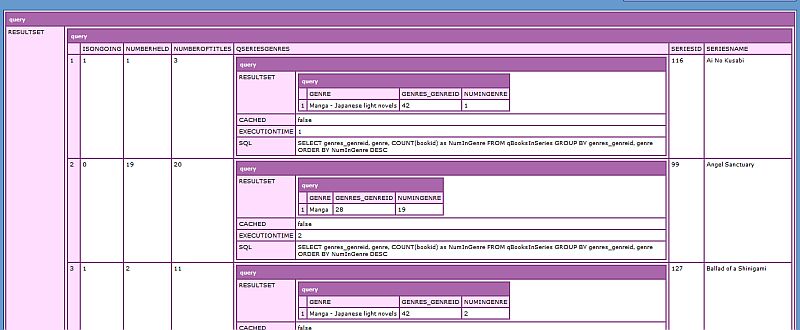
Now, there are some catches do doing this trick. One, you can't just add a column to your query, then do query set cell to put it into your table. For whatever reason, it just doesn't work. It only works if you build an array of the queries then append it as a new column to the query. So in my gateway, I cannot use:
<cfquery name="qSeries" datasource="#variables.dsn#">
            SELECT seriesid, seriesname, numberoftitles, isongoing, serieswebsite, 0 AS numberheld, NULL as qGenres
            FROM mylibrary_series
            ORDER BY seriesname
        </cfquery>

        <cfloop query="qSeries">
            <cfset qBooksInSeries = booksGateway.getBooks(WhichSeries = seriesid) />
            <cfset numHeld = qBooksInSeries.RecordCount />
            <cfset QuerySetCell(qSeries, "numberheld", numHeld, currentRow) />

            <cfquery name="qGenres" dbtype="query">
                SELECT genres_genreid, genre, COUNT(bookid) as NumInGenre
                FROM qBooksInSeries
                GROUP BY genres_genreid, genre
                ORDER BY NumInGenre DESC
            </cfquery>

            <cfset QuerySetCell(qBooksInSeries, "qGenres", qGenres) />
        </cfloop>
Instead, I must use:
<cfset var aGenres = ArrayNew(1) />

        <cfquery name="qSeries" datasource="#variables.dsn#">
            SELECT seriesid, seriesname, numberoftitles, isongoing, serieswebsite, 0 AS numberheld
            FROM mylibrary_series
            ORDER BY seriesname
        </cfquery>

        <cfloop query="qSeries">
            <cfset qBooksInSeries = booksGateway.getBooks(WhichSeries = seriesid) />
            <cfset numHeld = qBooksInSeries.RecordCount />
            <cfset QuerySetCell(qSeries, "numberheld", numHeld, currentRow) />

            <cfquery name="qGenres" dbtype="query">
                SELECT genres_genreid, genre, COUNT(bookid) as NumInGenre
                FROM qBooksInSeries
                GROUP BY genres_genreid, genre
                ORDER BY NumInGenre DESC
            </cfquery>

            <cfset ArrayAppend(aGenres, qGenres) />
        </cfloop>

        <cfset QueryAddColumn(qSeries, "qGenres", "VARCHAR", aGenres) />
Second, in the view, before I can look our query within the query, I must “rename” it.
<table class="listTable dataTable">
    <thead>
        <tr>
            <th>Name</th>
            <th>Genre</th>
            <th># I Have</th>
            <th># In Series</th>
            <th>Release Status</th>
            <th>Collection Status</th>
        </tr>
    </thead>
    <tbody>
        <cfoutput query="qSeries">
            <tr>
                <td><a href="#BuildURL("viewSeries", "WhichSeries=#seriesid#")#">#seriesname#</a></td>
                <td>
                    <cfset qMyGenres = qGenres />
                    <cfset thisRow = 1 />
                    <cfloop query="qMyGenres">
                        <a href="#BuildURL("myLibraryBrowseBooks", "WhichGenre=#genres_genreid#")#">#genre#</a><cfif thisRow NEQ qMyGenres.RecordCount>, </cfif>
                        <cfset thisRow = thisRow + 1 />
                    </cfloop>
                </td>
                <td>#numberheld#</td>
                <td>#numberoftitles#</td>
                <td><cfif isongoing>On-Going<cfelse>Finished</cfif></td>
                <td><cfif isongoing AND numberoftitles EQ numberheld>Current<cfelseif numberoftitles EQ numberheld>Complete<cfelse>In-Progress</cfif></td>
            </tr>
        </cfoutput>
    </tbody>
    </table>
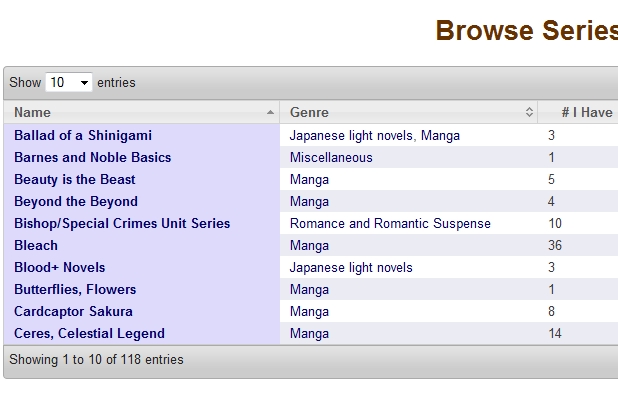
When we meet those two caveats, then we can do our trick to get the results we want, as seen in this screen snippet of the page displaying my series with multiple genres:
Nice 🙂